
Too long, didn’t read
Two shops, Cedar and Maple, share a pickup table and run the same report. A row policy lets each shop see its own pickups. When Cedar tries to update a row, the policy checks which row Cedar can reach and what it can save there.
Cedar opens its report and sees Maple’s pickup
Cedar opens its pickup report. Number 103 is there, along with Maple’s 104. Both are still pending.
Each shop connects with its own Postgres role, the identity the database uses to check its requests. Neither shop owns the table. Both roles can read pickup numbers and statuses, so when the report asks for every pickup, Maple sees both numbers too.
Start with what the login can ask for
Could a narrower grant hide 104? Think of a warehouse worker whose job is to mark pickups as running. On a separate table, the owner gives the worker’s login permission to update the status and read the fields the update uses. The worker can start the job. The delivery address is out of reach.
| What the worker asked for | Result |
|---|---|
| Set the status of 103 to running | 103 returned as running |
| Read the delivery address | Permission denied |
The update uses the pickup number and status to find the row and then returns both fields. The worker needs permission to read both and to change status. When the owner added a second pending pickup, the same grant let the worker update that one too. PostgreSQL column privileges · UPDATE privileges
Back at the shop table, both roles need the same report columns. Each needs a different set of rows.
Make the same report return different pickups
Keep both logins, both grants and the report as they are. Add one rule. A row belongs in the report when its stored shop matches the active role. Which numbers should each shop see now?
| Report opened by | Before the rule | After the rule |
|---|---|---|
| Cedar | 103, 104 | 103 |
| Maple | 103, 104 | 104 |
Both pickups are still pending. Cedar’s report just lost a line.
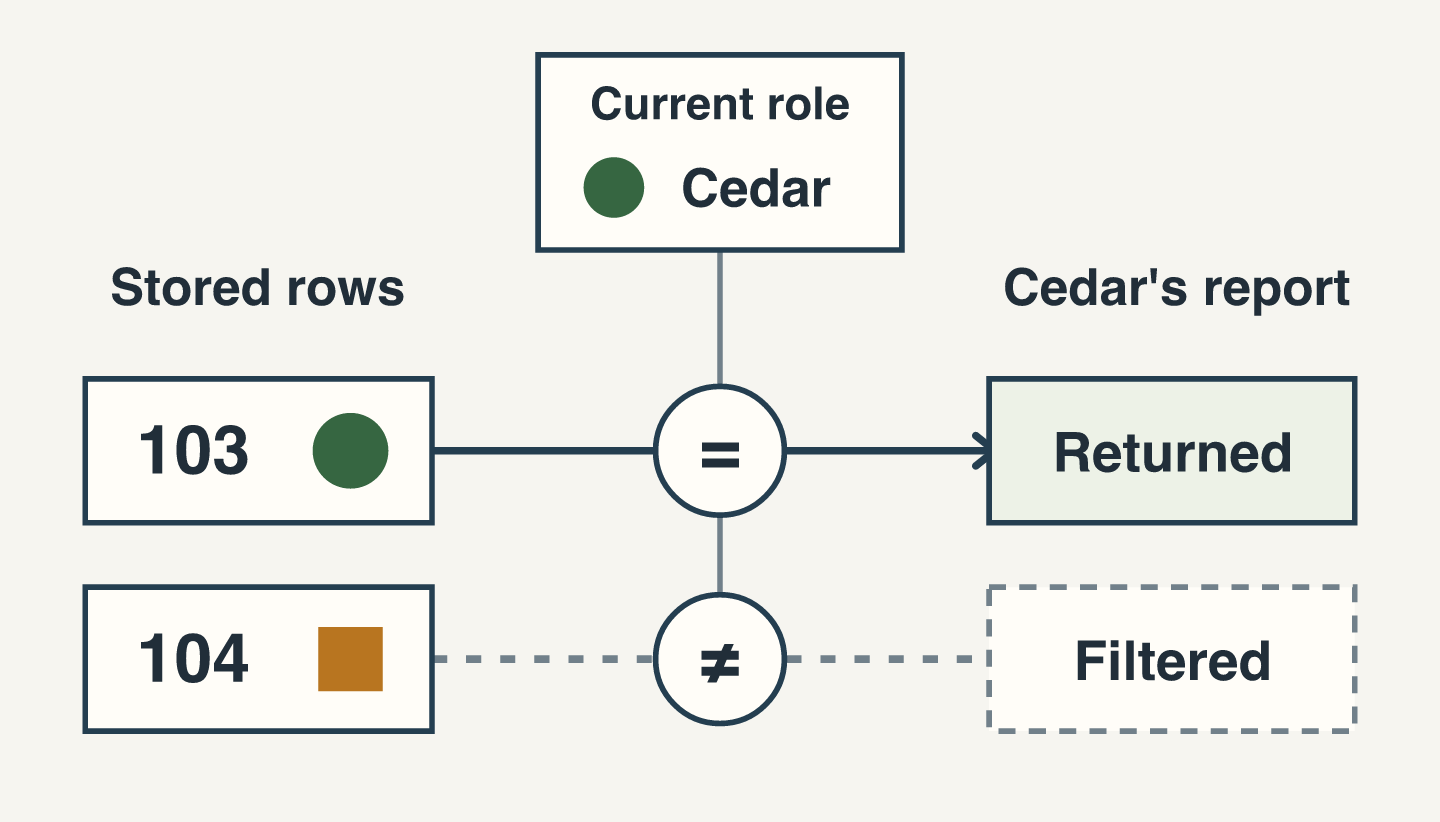
Postgres calls this row-level security (RLS). The owner enables it on the table and adds a read policy. Its USING condition compares each row’s shop_role to current_user, the active role. In Cedar’s report, both rows are compared to Cedar.
ALTER TABLE dispatch.pickup_jobs ENABLE ROW LEVEL SECURITY;

CREATE POLICY shop_reads ON dispatch.pickup_jobs
FOR SELECT
TO cedar_operator, maple_operator
USING (shop_role = current_user);
Ask for 104 by number as Cedar and the result is still empty. The read policy excludes that row. Enabling row-level security with no policy went further. Both ordinary shop logins kept their read grants and saw an empty report. PostgreSQL row security
Run the report as each shop. The table owner normally bypasses row-level security. If both reports run under one shared role, this rule sees the same current_user both times and gives both requests the same row access. PostgreSQL session information functions
Cedar can reach 103. Can it give 103 to Maple?
Cedar needs to mark its own pickup as running. The owner grants both shops permission to change status and, for this example, shop_role. With those grants in place, the row policy gets to decide whether Cedar can give a pickup away.
Cedar tries three actions, in order. Which one reaches a stored row and then fails?
| Cedar’s request | Row it can reach | What Postgres reported |
|---|---|---|
| Mark 103 running | 103 belongs to Cedar | 103 returned as running |
| Mark 104 running | No eligible row matches 104 | UPDATE 0 |
| Give 103 to Maple | 103 still belongs to Cedar | Update rejected (42501) |
The update policy’s USING condition checks the stored row. Pickup 104 belongs to Maple. Both the read and update policies exclude it, so the second statement affects zero rows.
On the third attempt, Cedar can reach 103. Both versions of 103 say running. Only shop_role would change.
| Version | shop_role | status |
|---|---|---|
| Stored | cedar_operator | running |
| Proposed | maple_operator | running |
WITH CHECK looks at what Cedar wants to save. The proposed row says Maple, so it fails. The update also needs to read id to find 103. That brings in the read policy, which also has to allow the proposed row. When each of these rules was relaxed in a separate run, the other still stopped the transfer. PostgreSQL CREATE POLICY
The transfer’s error said new row violates row-level security policy for table "pickup_jobs". Read the message as well as the code. A missing grant can also produce 42501, as it did when the worker asked for the address.
GRANT UPDATE (status, shop_role)
ON dispatch.pickup_jobs TO cedar_operator, maple_operator;

CREATE POLICY shop_updates ON dispatch.pickup_jobs
FOR UPDATE
TO cedar_operator, maple_operator
USING (shop_role = current_user)
WITH CHECK (shop_role = current_user);
After the rejection, the owner could still see Cedar’s 103 running and Maple’s 104 pending. A dashboard that only changes statuses can get an update grant on status alone.
Cedar’s report now shows only 103 while 104 stays in the same table. In the next chapter , Cedar runs that report through a view and 104 comes back.
Replay the shop reports and updates
The recorded runs used PostgreSQL 18.7. Use a disposable instance with cedar_operator and maple_operator available. Connect as an administrator who can provision the logins and own the new table.
CREATE SCHEMA dispatch;
CREATE ROLE cedar_operator LOGIN;
CREATE ROLE maple_operator LOGIN;

CREATE TABLE dispatch.pickup_jobs (
  id bigint PRIMARY KEY,
  shop_role name NOT NULL,
  status text NOT NULL
);

INSERT INTO dispatch.pickup_jobs VALUES
  (103, 'cedar_operator', 'pending'),
  (104, 'maple_operator', 'pending');

GRANT USAGE ON SCHEMA dispatch TO cedar_operator, maple_operator;
GRANT SELECT ON dispatch.pickup_jobs TO cedar_operator, maple_operator;
If the server uses password authentication, set the shop passwords from the owner session with \password role_name. Open a separate connection as each shop. Run this report in both shop sessions, then apply the read policy shown above as the owner and repeat the same report.
SELECT id, status
FROM dispatch.pickup_jobs
ORDER BY id;
Apply the grant and update policy shown above in the owner session. In Cedar’s psql session, turn autocommit on with \set AUTOCOMMIT on before starting any transaction. Run these three statements separately and in order.
UPDATE dispatch.pickup_jobs
SET status = 'running'
WHERE id = 103
RETURNING id, status;
UPDATE dispatch.pickup_jobs
SET status = 'running'
WHERE id = 104
RETURNING id;UPDATE dispatch.pickup_jobs
SET shop_role = 'maple_operator'
WHERE id = 103;After the rejection, run \errverbose in Cedar’s session to see the full message. Check the message for the cause in your run. Use the owner session to see both stored rows.
SELECT id, shop_role, status
FROM dispatch.pickup_jobs
ORDER BY id;
Replay the worker’s column grants in a separate database
Use a fresh database for this fixture. It has a delivery address and a different role, pickup_worker. The shop table above is a separate experiment.
Run the setup and grant as the owner. If you use password authentication, set pickup_worker’s password there with \password pickup_worker.
CREATE SCHEMA dispatch;

CREATE TABLE dispatch.pickup_jobs (
  id bigint PRIMARY KEY,
  status text NOT NULL,
  delivery_address text NOT NULL
);

INSERT INTO dispatch.pickup_jobs
VALUES (103, 'pending', 'Dock 4');
CREATE ROLE pickup_worker LOGIN;
GRANT USAGE ON SCHEMA dispatch TO pickup_worker;
GRANT SELECT (id, status), UPDATE (status)
ON dispatch.pickup_jobs TO pickup_worker;Connect as the worker. Use autocommit and run the two requests separately so the update commits before the rejected read.
UPDATE dispatch.pickup_jobs
SET status = 'running'
WHERE id = 103 AND status = 'pending'
RETURNING id, status;
SELECT delivery_address FROM dispatch.pickup_jobs;