Running SQLite in the Browser with OPFS and Web Workers

We live in a world where deploying a database usually means spinning up a server, managing connection strings, configuring ORMs, and inevitably accepting network latency. For a long time, this was just the cost of doing business.
But as a solo-founder, my goal isn’t to sell time—it’s to build assets. And to build assets quickly, I need to eliminate friction. The faster I can go from idea to a working MVP, the better. That means stripping away everything that isn’t strictly necessary.
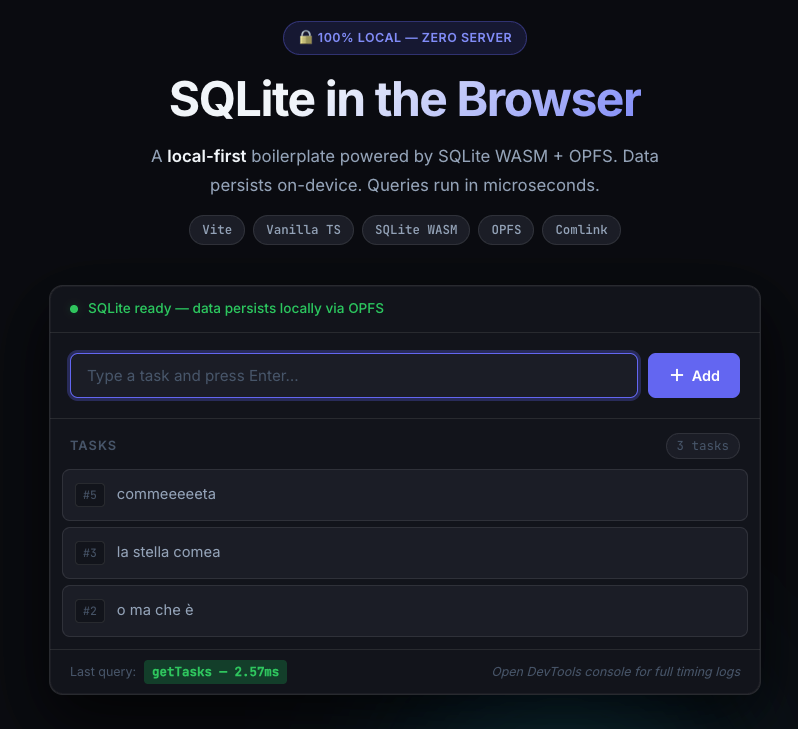
Recently, I set out to build a boilerplate that entirely removes the backend database from the equation, without sacrificing the power of SQL. What you’ll see in this post is a practical guide to running a full, official SQLite engine directly in the browser, leveraging the Origin Private File System (OPFS) and Web Workers.
Zero servers. Microsecond latency. 100% local and private.
Let’s break down how it works, why it’s a game-changer for indie devs, and the architectural pitfalls you need to avoid.
1. The Problem: The Main Thread Bottleneck
Running SQLite in the browser via WebAssembly (WASM) isn’t entirely new. The real challenge has always been persistent storage.
Standard browser storage ( LocalStorage , IndexedDB ) is either too slow, too limited, or fundamentally incompatible with how a synchronous relational database engine expects to read and write bytes to a disk.
Enter OPFS (Origin Private File System). It gives us a highly optimized, sandboxed file system that provides synchronous, byte-level access. It’s exactly what SQLite needs.
But there’s a catch: synchronous access blocks the thread. If we run SQLite with OPFS on the browser’s main thread, the UI will freeze every time we execute a complex query. It’s the equivalent of doing heavy construction work in the middle of a busy highway.
2. The Blueprint
To solve this, we need to isolate the database. We move the SQLite engine and the OPFS file system into a Web Worker.
Think of the Web Worker as a sealed glass room where the heavy data processing happens securely and quietly, completely decoupled from the UI.
Here is the flow:
By doing this, the UI stays running at 60FPS, no matter how hard the database is working.
3. The Implementation Step-by-Step
Let’s look at the actual code to make this happen.
Step 1: The Engine Room (worker.ts)
Inside the worker, we initialize the official @sqlite.org/sqlite-wasm package. We instantiate an OpfsDb, which automatically wires SQLite up to the browser’s high-performance file system.
import sqlite3InitModule from "@sqlite.org/sqlite-wasm";

let db: any;

export async function initDb() {
  if (db) return;

  const sqlite3 = await sqlite3InitModule();

  // The magic happens here: utilizing OPFS for persistence
  if (sqlite3.opfs) {
    db = new sqlite3.oo1.OpfsDb("/my-database.sqlite3");
    console.log("OPFS is available, created persistent database.");
  } else {
    db = new sqlite3.oo1.DB("/my-database.sqlite3", "ct");
    console.warn("OPFS is not available, created transient database.");
  }
}This simple setup means that even if the user refreshes the page or closes the browser, the data survives.
Step 2: The Bridge with Comlink
Web Workers communicate via postMessage, which can quickly turn into a messy, unmaintainable string of event listeners. We don’t want that.
Instead, I use Comlink by Google Chrome Labs. Comlink creates an RPC (Remote Procedure Call) bridge. It takes the functions defined in our worker and magically exposes them to the main thread as standard asynchronous functions.
// src/db.ts
import * as Comlink from "comlink";
import type { DbWorker } from "./worker";

// Instantiate the worker
const worker = new Worker(new URL("./worker.ts", import.meta.url), {
  type: "module",
});

// Wrap it with Comlink to get a typed, async API
export const dbWorker = Comlink.wrap<DbWorker>(worker);Now, in our UI code, querying the database is as simple as:
await dbWorker.exec(
  "CREATE TABLE IF NOT EXISTS users (id INTEGER PRIMARY KEY, name TEXT)",
);Step 3: The Security Bouncer (COOP/COEP)
Here is where most developers get stuck. For the SQLite WASM module to achieve maximum performance with OPFS, it requires a feature called SharedArrayBuffer.
Browsers heavily restrict SharedArrayBuffer due to security vulnerabilities like Spectre. To unlock it, your site must be served in a cross-origin isolated context.
You achieve this by enforcing strict HTTP headers:
Cross-Origin-Opener-Policy: same-originCross-Origin-Embedder-Policy: require-corp
If you are using Vite for development, you simply add these to your vite.config.ts:
// vite.config.ts
export default defineConfig({
  server: {
    headers: {
      "Cross-Origin-Opener-Policy": "same-origin",
      "Cross-Origin-Embedder-Policy": "require-corp",
    },
  },
});The Pitfall: What about production? If you deploy to a static host like Cloudflare Pages or GitHub Pages, you might not have the ability to set custom server headers easily.
The Solution: In my boilerplate, I included a fallback called coi-serviceworker.js. This is a tiny Service Worker that intercepts browser requests and dynamically injects the required COOP/COEP headers on the fly. It’s a lifesaver for static hosting.
4. Why This Matters
Approaching architecture with calma e feroce dignità (calm and fierce dignity) means rejecting unnecessary complexity.
By pushing the database to the edge—literally into the user’s browser—we achieve several things:
- Zero Cloud Costs: No RDS, no connection pooling, no scaling headaches.
- Total Privacy: The user’s data never leaves their device.
- Offline First: The app works flawlessly on an airplane or a subway.
This isn’t just a fun experiment; it’s a practical blueprint for building local-first applications. Whether you are building a habit tracker, a markdown editor, or a complex AI workflow tool, having a fully relational SQL database in the client empowers you to ship an MVP in days, not months.
Stop editing connection strings. Start building.
What do you think? Have you experimented with OPFS and WASM yet? Share your thoughts below or reach out on X.
If you want to use this architecture, you can grab the full, MIT-licensed boilerplate from my repository.