Ray Marching in GLSL, One Distance at a Time
A single triangle is about to render a sphere and a box.
The triangle contains neither object. It only covers the screen so the Graphics Processing Unit (GPU) runs a fragment shader once per pixel. Each invocation asks where its viewing ray first reaches a surface that exists as a formula, not as a mesh.
That sounds like we traded geometry for a harder problem. A ray contains infinitely many points. Testing all of them is impossible, and moving by a fixed amount either wastes work or jumps through thin objects.
The escape hatch is one number: the distance from the current point to the nearest surface.
The triangle is only a place to run the shader
The host program sends three clip-space vertices. They form an oversized triangle that covers the viewport. The vertex shader does no projection and receives no model.
attribute vec2 a_position;

void main() {
  gl_Position = vec4(a_position, 0.0, 1.0);
}For each covered pixel, the fragment shader converts gl_FragCoord into screen coordinates. It then builds a ray from a camera position ro through that pixel in direction rd.
vec2 uv = (2.0 * gl_FragCoord.xy - u_resolution.xy)
        / min(u_resolution.x, u_resolution.y);

vec3 ro = vec3(0.0, 0.0, 4.0);
vec3 rd = normalize(vec3(uv, -1.8));The Graphics Library Shading Language (GLSL) program now owns the scene test. The Web Graphics Library (WebGL) pipeline only rasterized the carrier triangle. This inversion is why an implicit scene can render without vertex buffers for every object.
It also explains the cost. A conventional mesh renderer asks the rasterizer which triangles cover a pixel. This shader launches a search from every pixel instead. The search must earn every step it takes.
A distance becomes a safe step
A sphere centered at the origin has a compact signed distance function (SDF). The function is negative inside, zero on the surface, and positive outside.
float sdSphere(vec3 point, float radius) {
  return length(point) - radius;
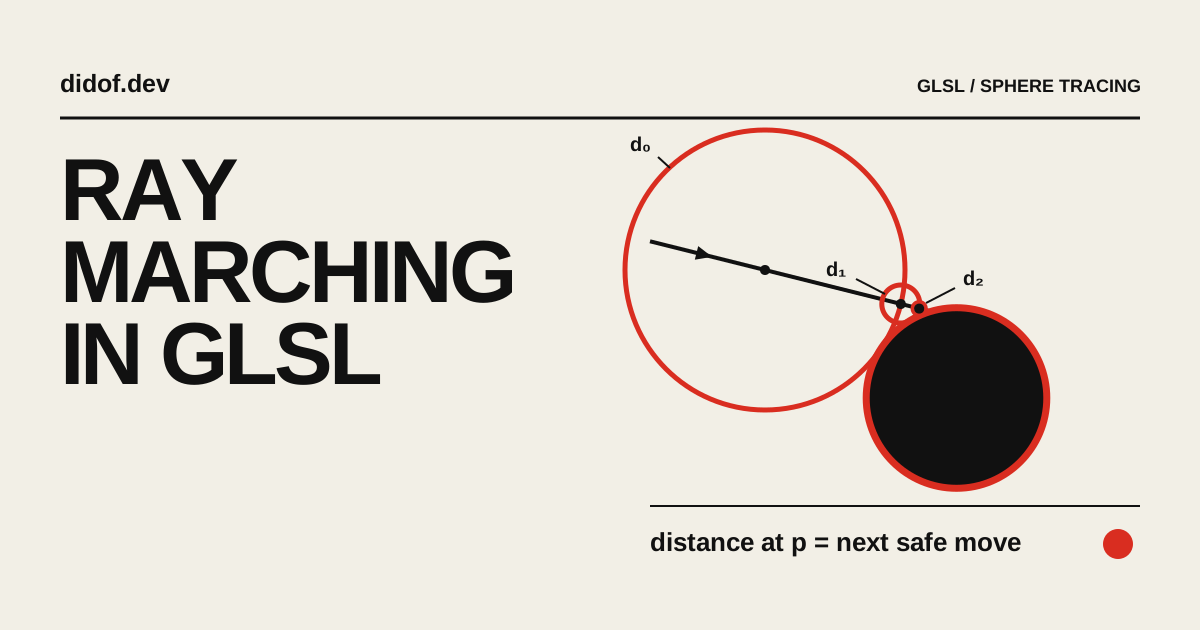
}Suppose the function returns 0.8. No surface can be closer than 0.8 units if the value is a valid distance bound. The ray may advance by that amount without crossing the nearest surface. At the new point, it asks again.
float travelled = 0.0;

for (int i = 0; i < 96; i++) {
  vec3 point = ro + rd * travelled;
  float distanceToScene = sceneDistance(point);

  if (abs(distanceToScene) < 0.001) break;
  travelled += distanceToScene;
}John Hart’s 1996 paper calls this method sphere tracing. Each distance defines an empty sphere around the sample point. The ray can cross that sphere safely, so one evaluation replaces many fixed micro-steps. “Ray marching” is the broader family name; sphere tracing is the distance-guided marcher used here.
Press Next sample in the lab. The active red circle is not a search radius chosen in advance. Its radius is the current d(p), and the readout uses that same value as the next move. Change the ray angle and the entire sequence changes, but the equality does not.
Walk one sample at a time
What exactly does one distance value let the ray skip?
- Travelled
- 0.000
- d(p)
- 2.307
- Next move
- 2.307
Each outlined circle is a certified empty region. The active red sample advances by the distance shown in the readout, then asks the field again.
The useful invariant is not “take large steps.” It is “never take a step larger than the lower bound you can justify.” A perfect Euclidean SDF gives the tightest obvious bound. A conservative distance estimator can also work, but it may need more steps.
The ray marching loop does not know what an object is
The loop above only calls sceneDistance(point). It does not know whether the returned number came from a sphere, a box, or a room assembled from dozens of formulas.
Here is an exact distance function for an axis-aligned box with half-size b:
float sdBox(vec3 point, vec3 b) {
  vec3 q = abs(point) - b;
  return length(max(q, 0.0))
       + min(max(q.x, max(q.y, q.z)), 0.0);
}The box and sphere become one scene by returning the smaller distance. Whichever surface is nearer wins.
float sceneDistance(vec3 point) {
  float sphere = sdSphere(point - vec3(-0.55, 0.0, 0.0), 0.9);
  float box = sdBox(point - vec3(0.65, 0.0, 0.0), vec3(0.68));
  return min(sphere, box);
}This min is a union. max(a, -b) subtracts shape b from shape a. A smooth minimum replaces the sharp handoff with a controlled blend. These operations change the field before the marcher sees it; the loop itself stays untouched.
The next lab opens on a two-dimensional field slice. The red contour is where the returned distance is zero; the surrounding bands are equal-distance intervals. Switch among Union, Smooth, and Subtract, then reveal the three-dimensional surface produced by the same scalar field.
Turn formulas into geometry
What changes when the marcher receives a different field?
min(dSphere, dBox)The operation changes the scalar returned by sceneDistance. The marching loop stays untouched while the surface, seam, cavity, and estimated normals change.
Select Normals after changing the operation. The colors are not decorative. Red, green, and blue encode the normal’s x, y, and z components. A hard union creates a discontinuous winner at an intersection. A smooth union changes the field around that seam, so the estimated normal turns gradually.
This composability is the attraction. Moving a mesh means changing vertices or a transform matrix. Moving an SDF primitive means changing the point before evaluating the formula. Repetition, twisting, and subtraction can all happen in coordinate space without generating new triangles.
The same freedom creates a boundary. Not every convenient function remains an exact distance after a deformation or blend. If it overestimates the safe distance, the marcher can cross a surface. If it underestimates, the image stays correct but costs more evaluations.
A hit point still has no color
The loop returns a position near the surface. It does not return a normal, material, light, or shadow.
An SDF supplies a normal through its gradient: the direction in which distance increases fastest. The shader estimates that gradient by sampling the scene a small amount on both sides of the hit point.
vec3 estimateNormal(vec3 p) {
  vec2 e = vec2(0.001, 0.0);

  return normalize(vec3(
    sceneDistance(p + e.xyy) - sceneDistance(p - e.xyy),
    sceneDistance(p + e.yxy) - sceneDistance(p - e.yxy),
    sceneDistance(p + e.yyx) - sceneDistance(p - e.yyx)
  ));
}That is six more scene evaluations after the primary ray hits. A cheaper tetrahedral estimate can reduce the count, but the causal relationship is the same: local changes in distance reveal surface orientation.
Lighting then becomes ordinary vector math.
vec3 lightDirection = normalize(vec3(-0.7, 1.0, 0.65));
float diffuse = max(dot(normal, lightDirection), 0.0);
vec3 color = baseColor * (0.2 + 0.8 * diffuse);A shadow launches another distance-guided ray from the hit point toward the light. Ambient occlusion samples the field around the normal. Reflections launch another ray. The scene formula remains reusable, but every effect multiplies the number of times it runs. A conventional shadow map pays a different cost, which becomes visible when static Three.js shadows stop updating .
This is the same workload question that appears in practical Three.js shader optimization : pixel count and repeated shader work matter together. A beautiful ten-step field at half resolution can be cheaper than a plain hundred-step field at full resolution.
Three controls decide whether the surface exists
The shader cannot loop forever or compare floating-point values with mathematical zero. It needs a hit tolerance, a maximum step count, and a maximum travel distance.
if (abs(distanceToScene) < HIT_EPSILON) return travelled;
if (travelled > MAX_DISTANCE) return MISS;
if (step == MAX_STEPS - 1) return MISS;These constants look like quality knobs. They are also part of the rendering contract.
HIT_EPSILON defines how close counts as contact. Make it too large and surfaces swell, corners soften, and shadows detach. Make it too small and rays spend evaluations approaching a surface they can never represent exactly.
MAX_STEPS caps work. A low limit does not produce a lower-resolution truth. It converts late hits into misses, often carving holes into silhouettes or distant geometry.
STEP_SCALE is different. Values below one are conservative and slower. A value above one is not an optimization of sphere tracing; it breaks the guarantee that made the step safe.
Compare correct with broken
Which control changed the geometry, and why?
The left half is a fixed safe reference. The right half uses the selected budget, epsilon, and step scale so similar-looking holes can be traced to different causes.
The final lab keeps a safe reference on the left. The right side starts with only six samples, enough to reveal a hole that a single full-frame render would make difficult to diagnose. Choose Loose epsilon or Unsafe scale and the visible error changes while the reference stays fixed.
Use the Marching work view to see which pixels consume most of their available budget. A low budget and an unsafe scale can both remove geometry, but one stops before convergence while the other steps beyond the certified empty region. The comparison turns a visual symptom into a causal diagnosis.
The component renders only when its controls, camera, or size change. It also stops drawing while off-screen using the same Intersection Observer mechanism that protects other interactive pages from invisible work. Three laboratories should not become three permanent render loops.
The complete ray marching renderer is small because its assumptions are large
Stripped of camera controls, scene operations, normals, and shadows, the fragment shader fits in one screen.
precision highp float;

uniform vec2 u_resolution;

float sdSphere(vec3 p, float radius) {
  return length(p) - radius;
}

float sceneDistance(vec3 p) {
  return sdSphere(p, 1.0);
}

void main() {
  vec2 uv = (2.0 * gl_FragCoord.xy - u_resolution.xy)
          / min(u_resolution.x, u_resolution.y);
  vec3 ro = vec3(0.0, 0.0, 4.0);
  vec3 rd = normalize(vec3(uv, -1.8));
  float travelled = 0.0;
  bool hit = false;

  for (int i = 0; i < 96; i++) {
    vec3 p = ro + rd * travelled;
    float distanceToScene = sceneDistance(p);

    if (abs(distanceToScene) < 0.001) {
      hit = true;
      break;
    }

    travelled += distanceToScene;
    if (travelled > 20.0) break;
  }

  gl_FragColor = hit
    ? vec4(0.85, 0.18, 0.13, 1.0)
    : vec4(0.95, 0.94, 0.90, 1.0);
}The OpenGL Shading Language specification explains the language and execution model behind this shader. It does not make the distance function conservative, choose an epsilon, or guarantee convergence. Those belong to the renderer we built on top.
Ray marching is unusually good when the scene is naturally implicit: mathematical surfaces, procedural repetition, volumetric density, or geometry that benefits from boolean composition. It is less forgiving when the scene starts as millions of unrelated triangles, requires stable texture coordinates everywhere, or cannot afford a variable loop per pixel.
The opening triangle never contained the objects. It carried one question to every pixel: “How far is the nearest surface from here?” The image exists because the shader can trust each answer just long enough to ask again.