Why JavaScript thinks 7 is an emoji
This is valid JavaScript:
/\p{Emoji}/u.test("7"); // trueApparently, JavaScript thinks 7 is an emoji.
It gets better. The same test returns true for every ASCII digit, plus # and *. None of them has suddenly turned yellow or acquired a face. They still look like text.
This is not a regex bug. It is a correct answer to a question we probably did not mean to ask.
The regex never looked at the screen
The \p{...} syntax is called a Unicode property escape. It asks whether a code point belongs to a named set in the Unicode Character Database.
In this case, the set is literally called Emoji. Unicode Emoji defines an emoji character as a character with that property. ECMAScript exposes the same property to regular expressions.
So the regex does not inspect a glyph, a font or a screenshot. It looks up U+0037, the code point for 7, and finds Emoji=Yes.
That still leaves the awkward part. Why did Unicode put an ordinary digit there?
Seven is a component waiting for two more pieces
The answer is hiding in this version of seven:
7️⃣That keycap is not one encoded character. It is a three-part sequence:
U+0037  DIGIT SEVEN
U+FE0F  VARIATION SELECTOR-16
U+20E3 COMBINING ENCLOSING KEYCAPThe first part supplies the symbol. The invisible variation selector requests emoji-style presentation. The final combining mark asks the renderer to put the symbol inside a keycap.
Unicode defines the same construction for every digit, # and *: [0-9#*] + U+FE0F + U+20E3. Its Emoji 17.0 data therefore marks those base characters as both Emoji and Emoji_Component.
7 belongs to the machinery used to build an emoji. That does not mean 7 alone should be drawn as one.
This is the same distinction that lets one family emoji have four different string lengths: a picture that looks atomic can be assembled from several encoded parts. Here, however, we are not counting the parts. We are asking what role each part is allowed to play.
Three properties, three different questions
A tempting fix is to replace Emoji with Emoji_Presentation:
/\p{Emoji_Presentation}/u.test("7"); // falseThis property asks whether a character should appear as an emoji by default. It correctly excludes the ordinary digit.
Unfortunately, it also excludes this:
/\p{Emoji_Presentation}/u.test("❤️"); // falseThe heart appears as an emoji because the full string contains U+FE0F, the emoji presentation selector. The base heart does not have default emoji presentation, and the selector itself does not have the Emoji_Presentation property. Testing the code points one at a time misses the instruction created by the sequence.
Current ECMAScript has a third tool for runtimes that support the v regex flag: Unicode properties of strings. Unlike ordinary character properties, these can recognize a sequence of several code points.
/^(?:\p{RGI_Emoji})$/v.test("7");  // false
/^(?:\p{RGI_Emoji})$/v.test("7️⃣"); // true
/^(?:\p{RGI_Emoji})$/v.test("❤️"); // trueRGI means Recommended for General Interchange. RGI_Emoji covers characters and complete sequences that Unicode recommends for broad cross-platform support. It recognizes the construction instead of merely noticing that one component has an emoji-related property.
These tests now answer three distinct questions:
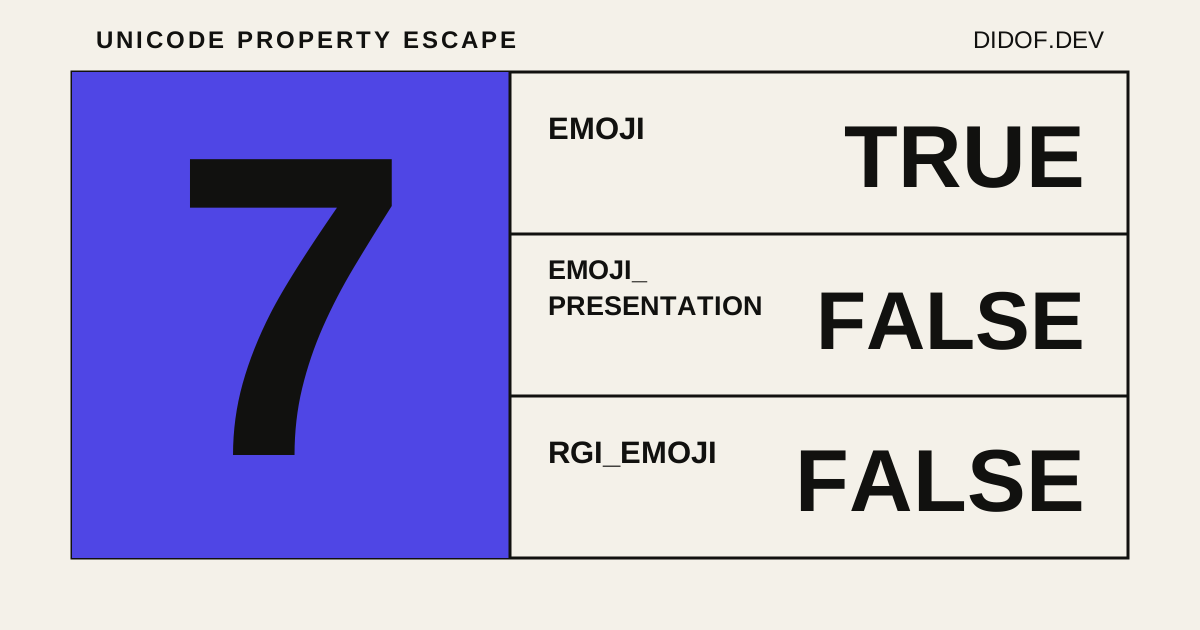
| Test | What it asks about 7 | Result |
|---|---|---|
\p{Emoji} | Does this code point have Unicode’s Emoji property? | true |
\p{Emoji_Presentation} | Does this code point default to emoji presentation? | false |
\p{RGI_Emoji} | Is this complete string an RGI emoji? | false |
No row is contradicting another. We changed the question each time.
The wrong question leaves strange debris
This distinction matters as soon as the program does something with the match.
Suppose we try to remove emoji from text:
"Studio 7".replace(/\p{Emoji}/gu, "");
// "Studio "The regex quietly deletes an ordinary digit. With a real keycap sequence, the result is stranger:
const remainder = "7️⃣".replace(/\p{Emoji}/gu, "");

[...remainder].map(character =>
  `U+${character.codePointAt(0).toString(16).toUpperCase()}`
);

// ["U+FE0F", "U+20E3"]The remover deleted 7 because that code point has Emoji=Yes. It left the invisible presentation selector and the combining keycap mark because they do not. Depending on the font, the residue may be invisible, appear as a broken mark or attach itself somewhere unexpected.
The family from the previous article fails in the same way. Removing every Emoji code point deletes the people but leaves three Zero Width Joiners in the string. The output can look empty while still containing data.
For an emoji-only field, there is another independent trap. A bare .test() asks whether the input contains a match:
/\p{RGI_Emoji}/v.test("invoice 7️⃣ ready"); // trueIf the product rule is that the entire value must consist of RGI emoji, the regex needs whole-string semantics too:
const emojiOnly = /^(?:\p{RGI_Emoji})+$/v;

emojiOnly.test("7");   // false
emojiOnly.test("7️⃣");  // true
emojiOnly.test("7️⃣❤️"); // trueThat is a better implementation for that specific requirement. It is not a universal definition of everything a platform might display as an emoji. The RGI set is versioned, vendors still control the final glyph, and Unicode does not currently give RGI_Emoji a stability guarantee across future releases.
“Is this an emoji?” is still missing a requirement
JavaScript never decided that the glyph 7 looks like an emoji. It found a property attached to U+0037 because that code point participates in keycap emoji sequences.
The renderer sees a sequence and tries to draw a picture. The regex sees code points and registered strings. Those are different layers, with different definitions of success.
So “detect emoji” is not yet a complete task. Do we want code points that can participate in emoji, default emoji presentation, complete RGI sequences, or a field made exclusively from them?
Until that decision is explicit, true can be perfectly correct and still produce the wrong program.