Why JavaScript says this emoji is 11 characters long
Paste this family into a JavaScript console:
const family = "👨👩👧👦";
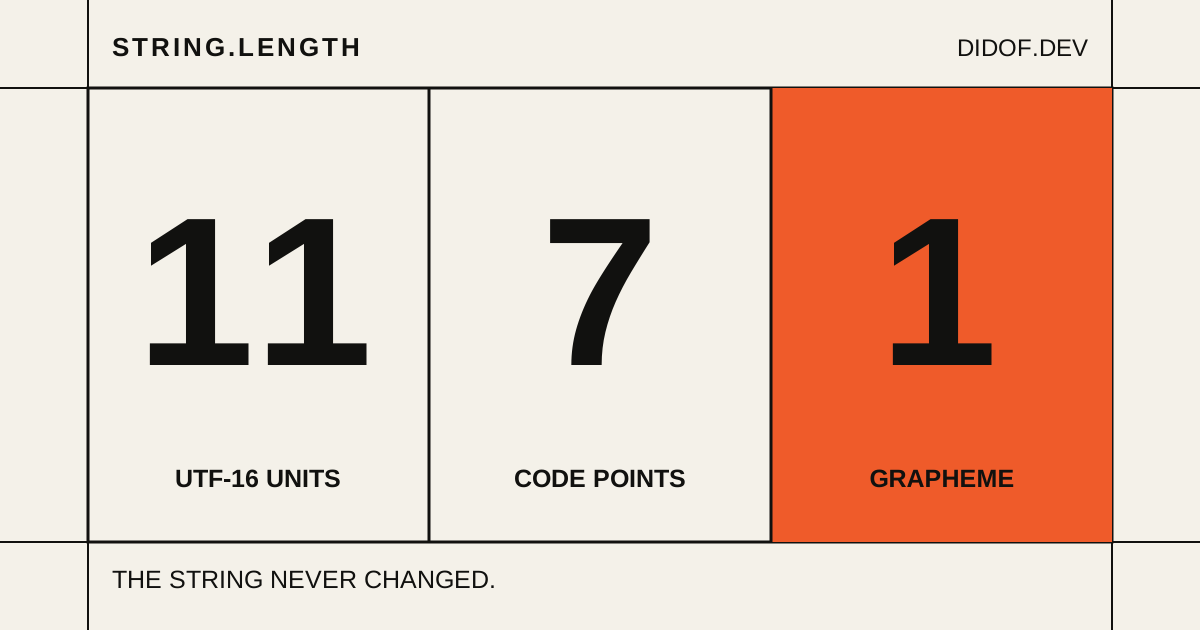
family.length; // 11There is one family on the screen. JavaScript says eleven.
Fine. Maybe length is just weird. Let’s try two other ways of splitting the string:
family.split("").length; // 11
[...family].length; // 7Better, somehow. We have reduced one visible symbol from eleven things to seven things without changing a pixel.
There is a fourth answer too:
const segmenter = new Intl.Segmenter("en", {
  granularity: "grapheme"
});

[...segmenter.segment(family)].length; // 1And if we encode the same string as UTF-8, it occupies 25 bytes.
So this family is 25, 11, 7 and 1. None of those numbers is a mistake.
The eleven are really there
The family is not stored as a single “family” character. Underneath the picture are four people joined by three invisible characters:
U+1F468  MAN
U+200D   ZERO WIDTH JOINER
U+1F469  WOMAN
U+200D   ZERO WIDTH JOINER
U+1F467  GIRL
U+200D   ZERO WIDTH JOINER
U+1F466 BOYThe invisible character is called a Zero Width Joiner, usually shortened to ZWJ. Its job is in the name: take up no visible width and ask the renderer to join the emoji around it.
“Ask” matters. A font or platform that recognizes this sequence can draw one family. A system that does not recognize it can fall back to separate people. The text has not changed; only the renderer’s knowledge has. Unicode defines both the sequence and its fallback behavior in the Unicode Emoji specification .
Now we can account for JavaScript’s eleven.
JavaScript indexes strings in UTF-16 units, each 16 bits wide. The four people need two units each. Every ZWJ needs one. That gives us eight plus three: eleven. length is reporting exactly what the ECMAScript string model tells it to report.
This is also why split("") did not help. It cuts at the same UTF-16 boundaries. For many emoji, that means it can separate the two halves of what is supposed to be one Unicode value. Those two halves are called a surrogate pair, which is a wonderfully technical name for “please do not cut here.”
Spread fixes one problem
The string iterator used by [...family] knows how to put surrogate pairs back together. It returns complete Unicode code points instead of individual UTF-16 units.
For our family, that means four people plus three joiners:
[...family];

// MAN, ZWJ, WOMAN, ZWJ, GIRL, ZWJ, BOY
// 1 2 3 4 5 6 7Seven is a useful answer if we want to inspect the Unicode values in the string. It is still a strange answer if we are building a character counter for a text box.
Spread understands how a code point is encoded. It does not understand which code points belong together on screen.
Emoji are small assemblies
The family is a dramatic example, but it is not an exotic exception. Many familiar emoji are assembled from smaller parts:
| What we see | What is in the string | Code points |
|---|---|---|
👩🏽💻 | woman + skin tone + ZWJ + laptop | 4 |
🇮🇹 | regional indicator I + regional indicator T | 2 |
1️⃣ | 1 + emoji presentation selector + keycap mark | 3 |
❤️ | heart + emoji presentation selector | 2 |
The Italian flag is especially pleasing: there is no single “Italy flag” code point in the string. There are two regional-indicator letters, I and T, which a supporting renderer presents as a flag.
The heart hides a smaller surprise. ❤ and ❤️ can look almost identical, but the second one contains an extra code point called a variation selector. It asks for emoji-style presentation. Deleting or truncating that invisible value can change how the heart is drawn even though no ordinary letter disappeared.
Emoji only make the layers unusually easy to see. The letter é can be stored as one code point, or as e followed by a combining accent. Those strings look the same in many fonts, but they are assembled differently too.
This is the recurring trick. What looks atomic on screen can be a short sequence with instructions tucked inside it.
It creates a second trap for code that tries to identify emoji: even the ordinary character 7 has Unicode’s Emoji property . That is not another way of measuring this string. It is another question entirely.
String inspector
One string, four measurements
Choose an example or paste your own. The text stays the same; only the unit changes.
UTF-16 units
Code points
Graphemes
This browser does not expose Intl.Segmenter, so grapheme segmentation is unavailable.
Count what the person can delete
For cursor movement, backspace and visible character limits, software usually needs a larger boundary than a code point. Unicode calls that boundary an extended grapheme cluster.
The name is heavier than the idea. A grapheme cluster is a practical attempt to keep together the pieces that a reader experiences as one text unit: a letter and its combining accent, a flag pair, an emoji with a skin-tone modifier, or a family joined by ZWJs. The default rules live in Unicode Text Segmentation , and JavaScript exposes them through Intl.Segmenter .
function graphemes(text) {
const segmenter = new Intl.Segmenter("en", {
granularity: "grapheme"
});
return [...segmenter.segment(text)]
.map(({ segment }) => segment);
}
graphemes(family); // ["👨👩👧👦"]Now we get one, which is probably the answer a text-field counter wanted.
Probably—not universally. A grapheme cluster is a text boundary, not a promise that every font will draw one glyph. A protocol might care about bytes. JavaScript string indices still use UTF-16 units. Code that examines Unicode data may need code points. Intl.Segmenter has not discovered the true length of the string; it has answered a more useful question for this particular job.
How one symbol fails a five-character limit
Imagine a profile field labelled “Maximum 5 characters.” The validation is entirely ordinary:
function isValid(value) {
  return value.length <= 5;
}

isValid(family); // falseNothing is broken in the function. The bug is in the agreement between the interface and the implementation. The interface uses “character” to mean something a person can see. The validator uses it to mean a UTF-16 unit. One family consumes eleven of those units, so a field advertising five visible characters rejects it.
Truncation is nastier:
family.slice(0, 4);slice() also cuts at UTF-16 positions. In this case, position four lands inside the surrogate pair for the second person. Other cut points can remove a skin-tone modifier, separate a flag or leave a joiner without the sequence it was meant to join.
If the product rule is genuinely about visible text, the limit should use the same grapheme boundaries:
function limitVisibleText(value, maximum) {
return graphemes(value).slice(0, maximum).join("");
}
limitVisibleText(family, 1); // "👨👩👧👦"The family survived because we stopped cutting the storage representation and started cutting the units the interface claims to count.
“Maximum 50 characters” is not a complete specification
The family never changed. It occupies 25 bytes when encoded as UTF-8, 11 UTF-16 units inside JavaScript, 7 Unicode code points and 1 grapheme cluster under the default segmentation rules.
The number only becomes wrong when we attach it to the wrong decision.
So when a product requirement says “maximum 50 characters,” the awkward question is not an implementation detail. It is the requirement that is still missing: 50 bytes, 50 UTF-16 units, 50 code points, or 50 things the person typing can reasonably perceive as text?